How EOS Core Works
This guide walks through the complete calculation process, from raw product data to final environmental impact scores.
The Calculation Graph
EOS Core uses a calculation graph architecture where products and ingredients are represented as nodes with relationships. Gap Filling Modules (GFMs) operate on these nodes to fill missing data and calculate impacts.

Step 1: Input Processing
Accepted Input Formats
The engine accepts product data with varying levels of detail:
// Minimal input - just a product name
{
  "name": "Chicken Curry with Rice"
}

// Structured input with ingredients
{
  "name": "Chicken Curry with Rice",
  "ingredients": [
    { "name": "Chicken breast", "amount": 150, "unit": "g" },
    { "name": "Basmati rice", "amount": 200, "unit": "g" },
    { "name": "Coconut milk", "amount": 100, "unit": "ml" },
    { "name": "Curry paste", "amount": 30, "unit": "g" }
  ],
  "servings": 1
}
Graph Node Creation
Each product and ingredient becomes a node in the calculation graph:
Product Node: "Chicken Curry with Rice"
├── Flow Node: Chicken breast (150g)
├── Flow Node: Basmati rice (200g)
├── Flow Node: Coconut milk (100ml)
└── Flow Node: Curry paste (30g)
Step 2: Gap Filling Module Scheduling
The orchestrator coordinates which GFMs should run on which nodes.
Scheduling Logic
Each GFM implements two key methods:
should_be_scheduled()- Determines if this module is relevant for a nodecan_run_now()- Checks if all dependencies are satisfied
Orchestrator Loop:
1. Collect all GFMs that should_be_scheduled() on new nodes
2. For each scheduled GFM:
   - Check can_run_now()
   - If ready: execute run()
   - If waiting: reschedule for next iteration
3. Repeat until no more GFMs need to run
Available Gap Filling Modules
EOS Core includes modules for different calculation aspects:
| Module | Purpose |
|---|---|
match_product_name_gfm | Match product names to database entries |
origin_gfm | Determine geographic origin |
location_gfm | Handle location-specific factors |
greenhouse_gfm | Calculate greenhouse gas emissions |
water_scarcity_gfm | Calculate water footprint |
rainforest_gfm | Assess deforestation impact |
processing_gfm | Model food processing impacts |
transportation_decision_gfm | Determine transport modes |
transportation_mode_distance_gfm | Calculate transport distances |
impact_assessment_gfm | Aggregate impact calculations |
Step 3: Module Execution
When a GFM runs, it reads node properties, performs calculations, and writes results back to the graph.
Execution Flow Example
Product: "Organic Apple from Switzerland"

1. match_product_name_gfm
   → Matches to database entry "apple"
   → Sets category and FoodEx2 terms

2. origin_gfm
   → Detects "Switzerland" in name
   → Sets origin country: CH

3. transportation_decision_gfm
   → Determines transport from origin to consumption
   → Sets transport modes based on perishability

4. transportation_mode_distance_gfm
   → Calculates distances using EcoTransit API
   → Adds transport emissions to graph

5. matrix_calculation_gfm
   → Performs matrix-based LCA calculations
   → Aggregates all inventory data

6. impact_assessment_gfm
   → Calculates CO₂eq using IPCC methodology
   → Generates climate impact scores

7. water_scarcity_gfm
   → Applies regional water stress factors
   → Calculates water footprint

8. aggregation_gfm
   → Combines results from all ingredients
   → Produces final product-level scores
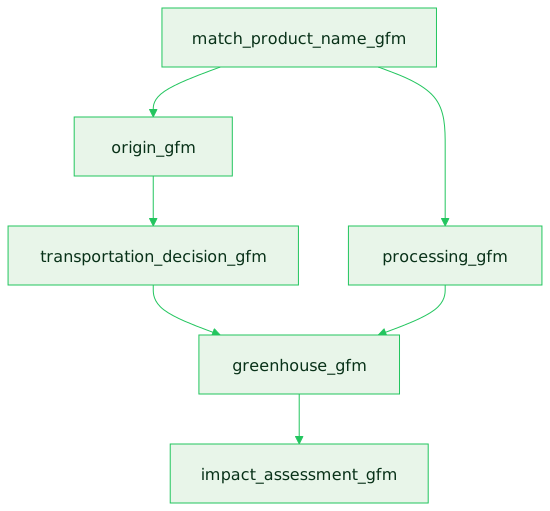
Parallel Execution
Independent modules can run in parallel when their dependencies are satisfied:
Step 4: Impact Calculation
Impact modules aggregate data from all sources into environmental metrics.
Matrix Calculation
Before impact assessment, the matrix_calculation_gfm performs matrix-based Life Cycle Assessment calculations for complex product systems. This is a critical performance component that:
- Converts the calculation graph into matrix representation
- Solves the LCA equation (h = B × A⁻¹ × f) efficiently
- Aggregates flows across complex product graphs
Climate Impact Components
The greenhouse gas calculation considers:
- Agricultural emissions - Farming and land use
- Processing emissions - Energy used in food processing
- Transport emissions - Distance × mode emission factor
- Packaging emissions - Material production and disposal
Multi-Dimensional Assessment
| Dimension | Unit | Calculation Basis |
|---|---|---|
| Climate | kg CO₂eq | GHG Protocol, IPCC factors |
| Water | liters | Blue water footprint |
| Rainforest | m² | Deforestation risk assessment |
| Animal Welfare | rating | Husbandry conditions |
Step 5: Output Generation
Final results are structured for API response.
Standard Output Format
The API returns a Calculation object with the calculation results:
{
  "uid": "calc-123e4567-e89b-12d3-a456-426614174000",
  "success": true,
  "statuscode": 200,
  "message": null,
  "final_root": {
    "activity": {
      "name": "Chicken Curry with Rice",
      "props": {
        "climate_impact": {
          "value": 2340,
          "unit": "g CO₂eq"
        },
        "water_footprint": {
          "value": 450,
          "unit": "L"
        },
        "daily_food_unit": {
          "value": 0.85
        }
      }
    },
    "sub_flows": [
      {
        "flow": { "name": "Chicken breast", "amount": 150, "unit": "g" },
        "activity": { "props": { "climate_impact": { "value": 1521 } } }
      },
      {
        "flow": { "name": "Basmati rice", "amount": 200, "unit": "g" },
        "activity": { "props": { "climate_impact": { "value": 468 } } }
      }
    ]
  },
  "data_errors": [],
  "created_at": 1705934400.0
}
The actual API response includes additional fields for configuration options, mutation logs, and detailed node properties. See the API v2 Reference documentation for the complete schema.
The Factory/Worker Pattern
Each GFM follows a Factory/Worker pattern where:
- Factory (Singleton): Initialized once per API service, holds database connections and caches
- Worker (Per Node): Created for each node, implements the calculation logic
For detailed information about the Factory/Worker architecture, including code examples and caching strategies, see the Technical Deep Dive.
Next Steps
- Gap Filling Modules - Deep dive into the module system
- Module Catalog - Available modules reference
- GFM SDK (coming soon) - Build custom modules