Gap Filling Modules (GFMs)
Gap Filling Modules are the building blocks of the EOS calculation engine. Each module is a specialized, self-contained unit that handles a specific aspect of environmental impact calculation.
What are Gap Filling Modules?
In the real world, food product data is often incomplete. A product might have:
- A name but no ingredient list
- Ingredients but no origin information
- Origin but no transport details
- Partial nutritional data
GFMs solve this problem by automatically "filling the gaps" in product data using scientific models, databases, and intelligent defaults.
The GFM Concept
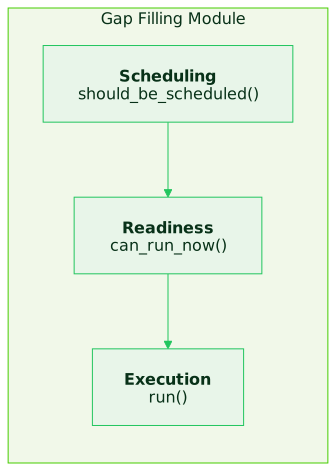
Each GFM consists of:
- Scheduling Logic - Determines if the module is relevant for a given node
- Readiness Check - Verifies all dependencies are satisfied
- Execution - The calculation logic that fills gaps and updates the graph
Available Modules
EOS includes 50+ specialized GFMs organized by function:
Matching Modules
Match product names and ingredients to database entries:
| Module | Purpose |
|---|---|
match_product_name_gfm | Matches product names to database entries |
attachment_ai_matching_gfm | AI-powered ingredient matching |
link_term_to_activity_node_gfm | Links terms to LCA activities |
link_food_categories_gfm | Assigns food categories |
Location Modules
Handle geographic and origin data:
| Module | Purpose |
|---|---|
origin_gfm | Determines product origin |
location_gfm | Geographic location handling |
transportation_decision_gfm | Determines transport modes |
transportation_mode_distance_gfm | Calculates transport distances |
Lifecycle Modules
Model processing and supply chain:
| Module | Purpose |
|---|---|
processing_gfm | Food processing impacts |
greenhouse_gfm | Greenhouse gas calculations |
conservation_gfm | Storage and preservation |
perishability_gfm | Shelf life and waste factors |
Impact Assessment Modules
Calculate environmental metrics:
| Module | Purpose |
|---|---|
impact_assessment_gfm | Aggregates impact calculations |
water_scarcity_gfm | Water footprint calculation |
rainforest_gfm | Deforestation impact |
vitascore_gfm | Nutritional scoring |
Aggregation Modules
Combine results across ingredients:
| Module | Purpose |
|---|---|
aggregation_gfm | Aggregates ingredient impacts |
ingredient_splitter_gfm | Breaks down composite ingredients |
ingredient_amount_estimator_gfm | Estimates ingredient quantities |
Module Architecture
Each GFM follows the Factory/Worker pattern:
# Factory - initialized once per service, manages workers
class ExampleGapFillingFactory(AbstractGapFillingFactory):
    def __init__(self, postgres_db, service_provider):
        super().__init__(postgres_db, service_provider)
        self.cache = {}  # Persistent cache across calculations

    async def init_cache(self):
        # Load required data into memory
        pass

    def spawn_worker(self, node):
        return ExampleGapFillingWorker(node)

# Worker - spawned per node, runs the calculation
class ExampleGapFillingWorker(AbstractGapFillingWorker):
    def should_be_scheduled(self) -> bool:
        # Is this GFM relevant for this node?
        return self.node.needs_processing()

    def can_run_now(self) -> GapFillingWorkerStatusEnum:
        # Are dependencies satisfied?
        if self.node.has_required_data():
            return GapFillingWorkerStatusEnum.READY
        return GapFillingWorkerStatusEnum.WAITING

    async def run(self, calc_graph):
        # Execute the gap-filling logic
        result = await self.calculate()
        self.node.set_property("result", result)
Why Factory/Worker?
| Benefit | Description |
|---|---|
| Isolation | Each calculation runs in its own worker instance |
| Caching | Factory maintains caches across calculations |
| Scalability | Workers can be distributed |
| Testing | Workers can be tested independently |
Orchestration
The orchestrator coordinates GFM execution:
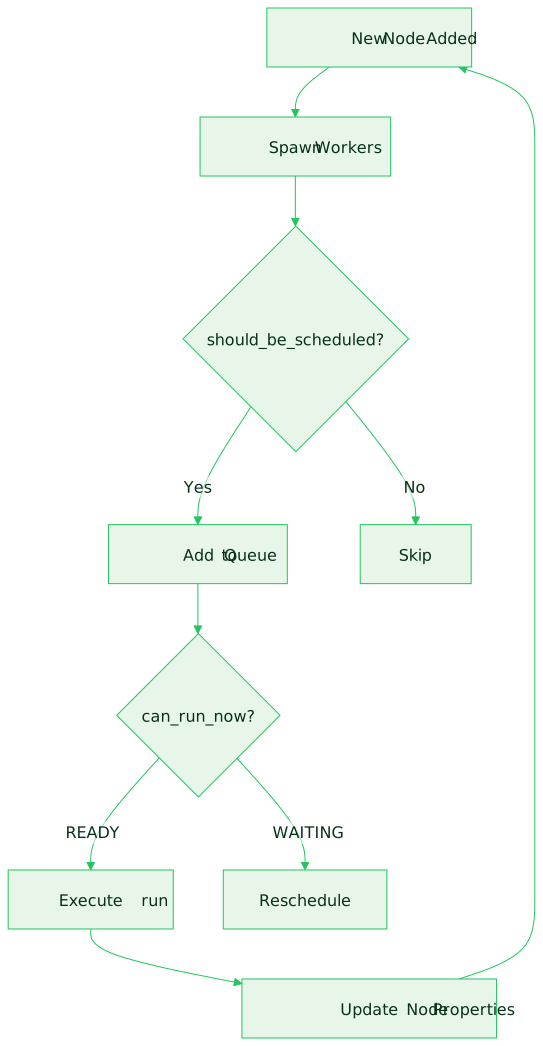
Scheduling Loop
- Node Addition - When nodes are added to the CalcGraph, the orchestrator spawns workers
- Scheduling Check - Each worker's
should_be_scheduled()is called - Readiness Check -
can_run_now()verifies dependencies - Execution - Ready workers execute asynchronously
- Graph Updates - Results are written back to node properties
- Propagation - New nodes may trigger additional GFMs
Module Dependencies
Modules depend on outputs from other modules:
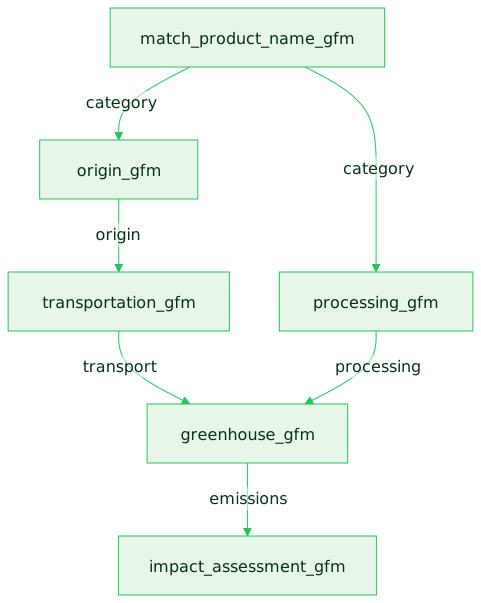
Dependencies are resolved automatically through the orchestrator's scheduling loop.
State Management
GFMs track their execution state per node:
# Per-node state stored in GfmStateProp
gfm_state = {
    "match_product_name_gfm": "completed",
    "origin_gfm": "completed",
    "greenhouse_gfm": "running",
    "impact_assessment_gfm": "pending"
}
State Values
| State | Description |
|---|---|
pending | Not yet scheduled |
waiting | Dependencies not satisfied |
running | Currently executing |
completed | Successfully finished |
failed | Execution failed |
Error Handling
GFMs implement graceful error handling:
async def run(self, calc_graph):
    try:
        result = await self.calculate()
        self.node.set_property("result", result)
    except Exception as e:
        # Log error with context
        logger.error("GFM failed",
            gfm=self.__class__.__name__,
            node_uid=self.node.uid,
            error=str(e))
        # Create DataError for tracking
        error = DataError(
            node_uid=self.node.uid,
            gfm_name=self.__class__.__name__,
            message=str(e),
            classification=ErrorClassification.calculation_error
        )
        self.node.add_error(error)
Fallback Strategy
When a module fails:
- Log the error - Structured logging with context
- Create DataError - Track for reporting
- Continue processing - Other modules can still run
- Flag uncertainty - Mark result with reduced confidence
Next Steps
- How GFMs Work - Detailed mechanics
- Module Catalog - All available modules
- GFM SDK (coming soon) - Build custom modules